Tutorial
Reading and Plotting Cut Files
We begin by reading in an existing cut file:
using TicraUtilities

cutfile = joinpath(dirname(pathof(TicraUtilities)), "..", "test", "test.cut")
cut = read_cutfile(cutfile)
Cut
ncomp 2
icut 1
icomp 2
text: 72-element Vector{String}
theta 0.0:0.5:180.0
phi 0.0:5.0:355.0
evec 361×72 Matrix{SVector{2, ComplexF64}}
We see that read_cutfile returns a Cut object. The information printed to the REPL shows that the Cut object contains 72 distinct ϕ cuts, each consisting of 361 points in the θ direction, with θ ranging from 0° to 180° in steps of 0.5°. See Cut for documentation on the remaining fields.
Values within the Cut object can be accessed via the functions get_ncomp, get_icut, get_icomp, get_text, get_theta, get_phi, and get_evec. Some derived quantities can be obtained via the functions power, amplitude_db, and phase_deg.
This package includes a recipe for plotting a Cut object using the standard Plots package. So a plot of the cut can be generated very simply:
using Plots
plot(cut)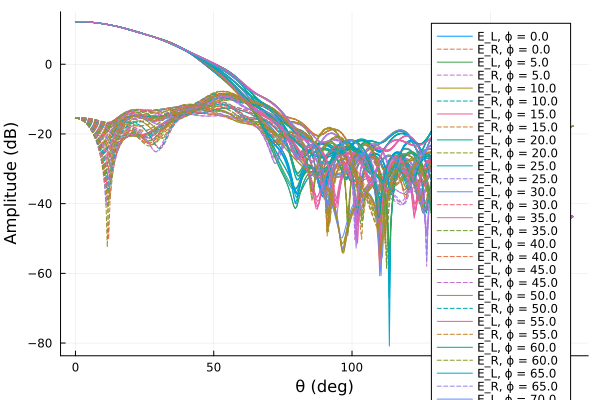
The default result in this case is not very satisfactory. Note that each trace is automatically labeled according to its polarization (either LHCP or RHCP for this case) and ϕ value, but there are too many ϕ cut labels to fit in the legend. Let's tweak the plot by just selecting a just a few ϕ values to plot. We will also normalize the amplitudes according to the peak directivity, and print this peak value in the title of the plot. Finally, we'll adjust the axes limits and tick locations:
peakdb = round(maximum_db(cut), digits = 3)
plot(
    cut,
    normalization = :peak,
    phi = 0:90:270,
    title = "Peak = $peakdb dB",
    framestyle = :box,
    xlim = (0, 180),
    xtick = 0:20:180,
    ylim = (-60, 0),
    ytick = -60:5:0,
)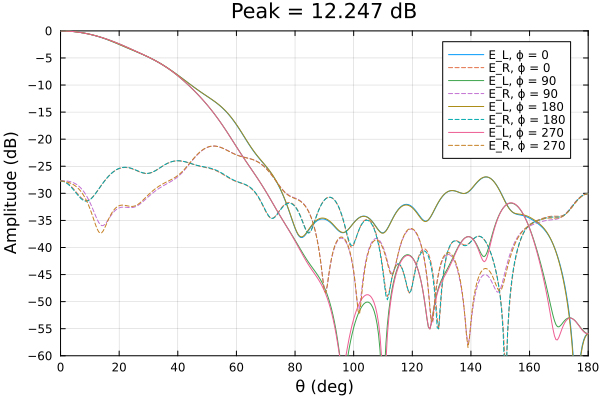
The plot appearance is now more pleasing. We used the maximum_db function to label the peak field value used for normalizing the plot. For plotting, most of the keyword arguments that were passed to the plot function above come standard with the Plots package, but phi and normalization are custom keywords introduced by TicraUtilities and are supported only when plotting a Cut object. The full list of custom keywords available for plotting Cut objects is presented in the table below:
Custom Plots Keywords Specific to Cut Objects
| Keyword | Description | Legal values |
|---|---|---|
| phi | ϕ value(s) to plot | Scalar or iterable (defaults to get_phi(cut)) |
| theta | θ value(s) to plot | Scalar or iterable (defaults to get_theta(cut)) |
| pol | Polarization to plot | :both, :copol, :xpol, 1, or 2 (defaults to :both) |
| quantity | Quantity to plot | :db (the default), :power, :linear, or :phase |
| normalization | How to normalize plot | :peak or a scalar (defaults to NaN meaning don't normalize) |
Values passed in via the phi keyword must all be present in the Cut object. If the values passed via the theta keyword are spaced more finely than those stored in the Cut object, the pattern will be interpolated onto these values using a cubic spline interpolant. This is demonstrated in the following example plot:
scatter(
    cut,
    label = "Interpolated In θ",
    pol = :copol,
    normalization = :peak,
    phi = 0,
    theta = 0:0.1:5,
    title = "Normalized Copol (LHCP), Peak = $peakdb dB",
    framestyle = :box,
    xlim = (0, 5),
    xtick = 0:0.5:10,
    ylim=(-0.2, 0.01),
    ytick = -10:0.05:0)
scatter!(
    cut,
    label = "No θ Interpolation",
    pol = :copol,
    normalization = :peak,
    phi = 0,
    marker = :cross,
    ms = 6,
    msw = 2)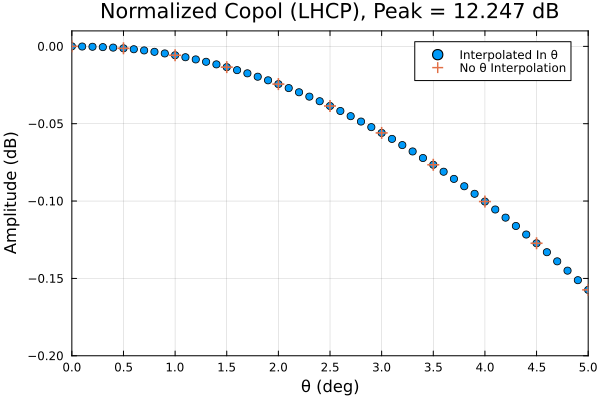
The above scatter plot clearly illustrates the results of interpolating in $\theta$. The example also shows that the default trace labels appearing in the legend can be overridden as desired.
Manipulation and Conversion of Cut Objects
Symmetric and Asymmetric Cuts
In the previous examples the cut variable contains "asymmetric" cuts, each beginning at $\theta = 0$. A "symmetric" cut would cover equal extents in the positive and negative $\theta$ directions. Functions asym2sym and sym2asym can be used to convert between these types of cuts. Continuing with the asymmetric Cut object from the previous examples:
scut = asym2sym(cut) # Create a symmetric cutCut
ncomp 2
icut 1
icomp 2
text: 36-element Vector{String}
theta -180.0:0.5:180.0
phi 0.0:5.0:175.0
evec 721×36 Matrix{SVector{2, ComplexF64}}
Note that the symmetric cuts only extend to 175° in $\phi$, and that each cut covers the range $-180^\circ \le \theta \le 180^\circ$. We plot the new cut below to see this alternative representation of the same data:
plot(
    scut,
    normalization = :peak,
    phi = 0:45:135,
    title = "Normalized Symmetric Cut, Peak = $peakdb dB",
    framestyle = :box,
    xlim = (-180, 180),
    xtick = -180:30:180,
    ylim = (-60, 0),
    ytick = -60:5:0,
)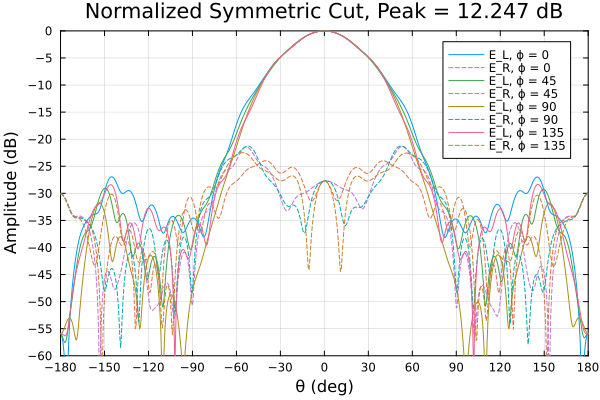
This type of symmetric plot can be useful for spotting pattern asymmetries.
Changing the Polarization Basis of a Cut
The functions convert_cut and convert_cut! can be used to change which of the following pairs of field components
- $E_\theta$ and $E_\phi$
- $E_R$ and $E_L$ (CP or Circular Polarization, right- and left-handed, resp.)
- $E_h$ and $E_v$ (L3 or Ludwig 3, directed along $x$ and $y$, resp.)
is used for representing the electric field vector stored in a Cut object. The cut variable used in the previous examples uses CP components, as can be verified using the get_icomp function:
get_icomp(cut)2The possible values for icomp and their meanings are documented in [1, Sec. 9.7, p. 3306]. Alternatively, one can request help on the Cut type at the Julia REPL. Note: At present, most of the functions in TicraUtilities support only 1, 2, or 3 as possible values for icomp. In this case, the value is 2, meaning that a circular polarization basis was used.
If we convert the polarization basis to a Ludwig 3 representation:
cut_L3 = convert_cut(cut, 3)
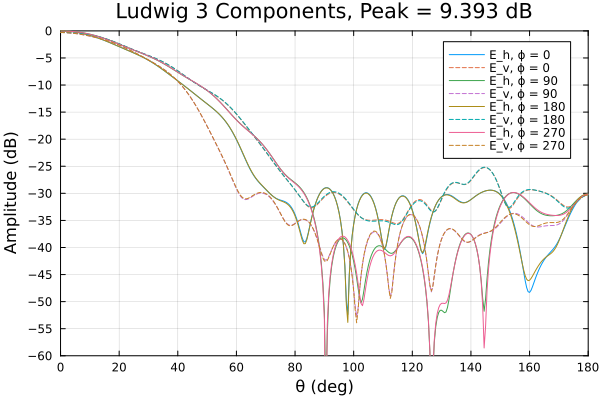
peakdb_L3 = round(maximum_db(cut_L3), digits = 3)9.393we see that the peak directivity has been reduced by about 3 dB from its previous value. Since the boresight radiated field is nearly perfectly circularly polarized, then both L3 components will be approximately equal in magnitude as shown in the following plot:
plot(
    cut_L3,
    normalization = :peak,
    phi = 0:90:315,
    title = "Ludwig 3 Components, Peak = $peakdb_L3 dB",
    framestyle = :box,
    xlim = (0, 180),
    xtick = 0:20:180,
    ylim=(-60, 0),
    ytick = -60:5:0,
)
Cut Normalization
Typically, the fields recorded in cut files are normalized so that the total radiated power is $4\pi$. When this is the case, the field magnitude squared is numerically equal to directivity. The power integral for a Cut object can be calculated using the power function:
power(cut) / 4π0.9999997731679888We see that the power in cut is very close to $4\pi$. Although not really necessary in this case, we can modify cut to make the normalization more nearly exact by using the normalize! function:
normalize!(cut)
power(cut) / 4π0.9999999999999991After explicitly normalizing the cut, its radiated power is almost exactly equal to $4\pi$.
Synthesizing a Cut from E- and H-Plane Patterns
A "BOR₁" horn [2] is rotationally symmetric and contains only TE₁ₙ and TM₁ₙ waveguide modes in its radiating aperture. Its radiated far field can therefore be expressed in terms of the E-plane and H-plane (principal plane) patterns it radiates when excited for linear polarization. The eh2bor1cut function synthesizes a Cut object for a BOR₁ antenna from its principal plane patterns, optionally adding in a specified level of crosspol due to an imperfect feed network.
We begin by reading a cut file for a BOR₁ horn created by TICRA's CHAMP program:
using TicraUtilities
using Plots
cutfile = joinpath(dirname(pathof(TicraUtilities)), "..", "test", "ticra_hpol_horn.cut")
cut = read_cutfile(cutfile)
println("Peak =  ", round(maximum_db(cut), digits = 2), " dB")
Peak = 24.96 dBcutCut
ncomp 2
icut 1
icomp 3
text
Field data in cuts
Field data in cuts
Field data in cuts
theta 0.0:0.5:180.0
phi 0.0:45.0:90.0
evec 361×3 Matrix{SVector{2, ComplexF64}}
As seen from the above output, the cut file contains 3 cuts at $\phi = 0^\circ, 45^\circ$, and $90^\circ$. Since the cut file was created for horizontal excitation of the horn, the dominant far-field polarization will be Ludwig 3 horizontal, which is stored in the first polarization slot of the cut. It also follows that the E-plane pattern can be extracted from the first ($\phi = 0^\circ$) cut and the H-plane pattern from the last ($\phi = 90^\circ$) cut:
fe = get_evec(cut, 1)[:, 1] # ϕ = 0° cut is E-plane for horizontal pol
fh = get_evec(cut, 1)[:, end] # ϕ = 90° cut is H-plane for horizontal pol
plot(xlim=(0, 180),
     xlabel = "θ (deg)",
     ylim = (-60, 30),
     ylabel = "Amplitude (dB)",
     framestyle = :box,
     title = "BOR₁ Horn Principal Plane Patterns",
)
theta = get_theta(cut)
plot!(theta, 10 .* log10.(abs2.(fe)), label = "E-Plane")
plot!(theta, 10 .* log10.(abs2.(fh)), label = "H-Plane")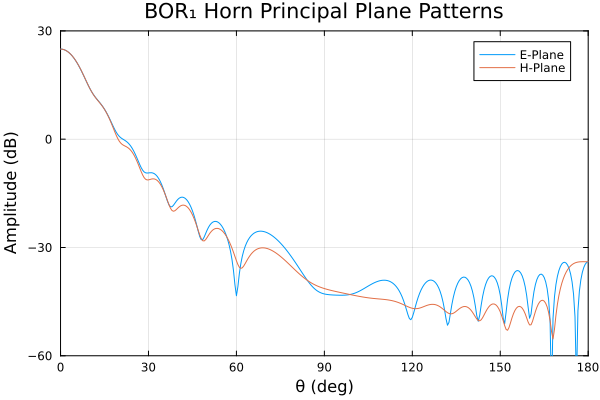
Suppose now that we wish to create a Cut object for this horn, but assuming that it has been excited to generate a predominantly RHCP (right-hand circularly polarized) far field:
cutrhcp = eh2bor1cut(theta, fe, fh; pol = :rhcp)
println("Peak RHCP =  ", round(maximum_db(cutrhcp), digits = 2), " dBi")
println("(Radiated power)/4π = ",  power(cutrhcp) / 4π)
Peak RHCP = 24.96 dBi
(Radiated power)/4π = 0.9999992995864277cutrhcpCut
ncomp 2
icut 1
icomp 2
text
phi = 0
phi = 90
phi = 180
phi = 270
theta 0.0:0.5:180.0
phi 0:90:270
evec 361×4 Matrix{SVector{2, ComplexF64}}
As shown above, the maximum field magnitude is about the same as that for the principal plane cuts. And since the cut is properly power-normalized, this value is the maximum partial directivity to RHCP polarization. As stated in the documentation for eh2bor1cut, cutrhcp contains cuts at $\phi = 0^\circ, 90^\circ, 180^\circ, \text{and } 270^\circ$. Plotting the cut at $\phi = 0^\circ$:
plot(cutrhcp,
     phi = 0,
     xlim = (0, 90),
     xtick = 0:10:90,
     ylim = (-60, 0),
     framestyle = :box,
     normalization = :peak,
     title = "BOR₁ Horn Excited for RHCP, Normalized Pattern")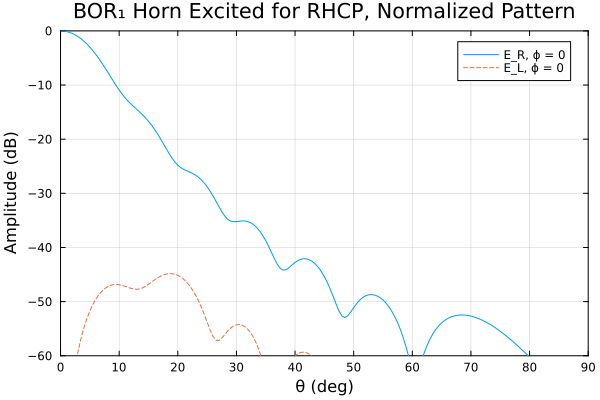
The plot confirms that the dominant polarization is RHCP. The maximum crosspol level is about 45 dB below the copol peak. To simulate the effect of an imperfect feed network that injects crosspol (LHCP) at a level 30 dB below the desired copol, we can use the xpd keyword argument:
cutrhcp2 = eh2bor1cut(theta, fe, fh; pol = :rhcp, xpd = -30)
plot(cutrhcp2,
     phi = 0,
     xlim = (0, 90),
     xtick = 0:10:90,
     ylim = (-60, 0),
     framestyle = :box,
     normalization = :peak,
     title = "RHCP-Excited BOR₁ Horn, Normalized Pattern\n-30 dB Xpol Added\n")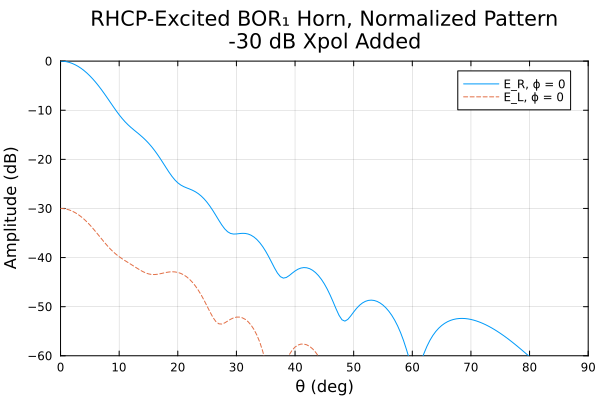
As expected, the boresight crosspol level is now 30 dB below the copol peak, and the crosspol pattern resembles a scaled version of the copol pattern, at least in the vicinity of boresight. Note that the phase of the injected crosspol can be specified using the xpphase keyword argument of eh2bor1cut.
After creating the Cut object cutrhcp in this manner, it can be saved as a TICRA-compatible cut file using write_cutfile, or it can be converted to a spherical wave expansion using cut2sph, as discussed below in SWE/Cut Conversion. The resulting SPHQPartition object can be saved as a spherical wave expansion (.sph) file, if desired, using write_sphfile.
Spherical Wave Expansions (SWEs)
The functions in TicraUtilities can read, write, and manipulate TICRA-compatible spherical wave expansion (.sph) files that employ the newer, more accurate, so-called "Q" modes. To read the contents of such a file, one uses the read_sphfile function. Below we demonstrate the function's use on a spherical wave expansion file previously generated using GRASP:
using TicraUtilities
sphfile = joinpath(dirname(pathof(TicraUtilities)), "..", "test", "center_element_rhcp_excited_q.sph")
sph_grasp = read_sphfile(sphfile)
SPHQPartition
prgtag 2024/06/13 at 08:14:07, Source: test01_asymmetric_tabulated_pattern, Freq [GHz]: 1.000000000
idstrg SWE
nthe 360
nphi 72
nmax 180
mmax 35
qsmns OffsetArray{ComplexF64}(1:2,-35:35,1:180)
powerms OffsetArray{Float64}(0:35)
read_sphfile returns an object of type SPHQPartition, containing the SWE data for a single partition (i.e., frequency) stored in a SWE file. If the file had consisted of multiple partitions then the returned object would be a vector of such objects. A SPHQPartition object (or a vector of such objects) can be written to a TICRA-compatible file using write_sphfile. The values stored in the fields of a SPHQPartition object can be retrieved using the functions get_prgtag, get_idstrg, get_nthe, get_nphi, get_nmax, get_mmax, get_qsmns, and get_powerms, along with get_t4 through get_t8.
SWE/Cut Conversion
Cut to SWE Conversion
A Cut object, a vector of Cut objects, or a cut file can be converted to SWE representation via the cut2sph function. We'll demonstrate this conversion using a measured cut file for a central element of a closely spaced array of planar radiating elements. Because of strong mutual coupling, the pattern is asymmetrical, as shown in the plot below:
using TicraUtilities
using Plots
cutfile = joinpath(dirname(pathof(TicraUtilities)), "..", "test", "center_element_rhcp_excited.cut")
cut_meas = read_cutfile(cutfile)Cut
ncomp 2
icut 1
icomp 2
text: 72-element Vector{String}
theta 0.0:1.0:180.0
phi 0.0:5.0:355.0
evec 181×72 Matrix{SVector{2, ComplexF64}}
plot(cut_meas, legend=nothing, framestyle=:box)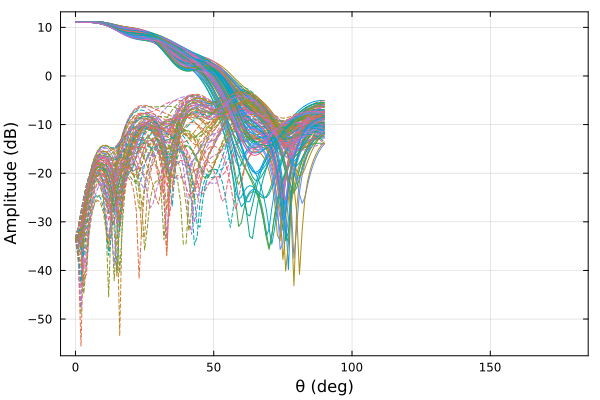
Note that although the cut file contains pattern data out to $\theta = 180^\circ$, the values for $\theta > 90^\circ$ are identically zero. This fact and the large number of samples in the two angular directions make it an interesting and relatively difficult case for spherical wave expansion. We generate the SWE representation as follows:
sph_julia = cut2sph(cut_meas)SPHQPartition
prgtag cut2sph 2026-06-08 13:30:49.205
idstrg Spherical Wave Q-Coefficients
nthe 360
nphi 72
nmax 180
mmax 35
qsmns OffsetArray{ComplexF64}(1:2,-35:35,1:180)
powerms OffsetArray{Float64}(0:35)
On a Core i7-9700 computer running Julia 1.11.0 this conversion takes about 45 msec. The sph_grasp object read in the previous example was generated by the TICRA GRASP program from the same measured cut file. The maximum difference between the spherical wave "Q" coefficients in sph_julia and sph_grasp is
maximum(abs, get_qsmns(sph_julia) - get_qsmns(sph_grasp))6.811512904856222e-6In the next section we show that both expansions provide similar accuracy in reconstructing the far-field pattern.
SWE to Cut Conversion
We can reconstruct the pattern of the previous example by converting the SPHQPartition object sph_julia into a new Cut object using the sph2cut function:
cut_julia = sph2cut(sph_julia) # Round trip via Julia: measured cut -> SWE -> reconstructed cutCut
ncomp 2
icut 1
icomp 2
text: 72-element Vector{String}
theta 0.0:1.0:180.0
phi 0.0:5.0:355.0
evec 181×72 Matrix{SVector{2, ComplexF64}}
We will compare this Cut object to one from cut file "center_element_rhcp_excited_q.cut". This latter file is also the result of a round-trip conversion cut $\rightarrow$ SWE $\rightarrow$ cut, beginning with the original measured data cut file, but performed entirely using the TICRA GRASP program. The copol and crosspol comparison is shown below:
cutfile = joinpath(dirname(pathof(TicraUtilities)), "..", "test", "center_element_rhcp_excited_q.cut")
cut_grasp = read_cutfile(cutfile) # Round trip via GRASP
rhcp_err_db =  10 * log10(maximum(abs2, get_evec(cut_julia, 1) - get_evec(cut_grasp, 1)))
lhcp_err_db =  10 * log10(maximum(abs2, get_evec(cut_julia, 2) - get_evec(cut_grasp, 2)))
(rhcp_err_db, lhcp_err_db) # Compare Julia and GRASP cut reconstructions
(-98.97448160074846, -98.81598541654193)As shown above, the maximum differences between the reconstructed fields via GRASP and Julia functions are extremely small, on the order of -100 dB. We can also compare the reconstructed fields versus the original measured cut data:
using LinearAlgebra: norm
julia_err_db = 20 * log10(maximum(norm, get_evec(cut_julia) - get_evec(cut_meas)))
grasp_err_db = 20 * log10(maximum(norm, get_evec(cut_grasp) - get_evec(cut_meas)))
(julia_err_db, grasp_err_db) # compare each to orig. measured cut
(-62.35423900263196, -62.32837972326217)GRASP- and Julia-reconstructed patterns show similar agreement with original measured data. Plots of the reconstructed copol and crosspol patterns confirm the similarity of the GRASP and Julia reconstructed pattern data:
using Plots
plot(xlim = (0, 180), ylim = (-100, 15), framestyle = :box,
     title = "Copol (RHCP) Comparison")
plot!(cut_julia, phi = 0, pol = 1, label = "RHCP sph2cut")
plot!(cut_grasp, phi = 0, pol = 1, ls = :dash, label = "RHCP GRASP")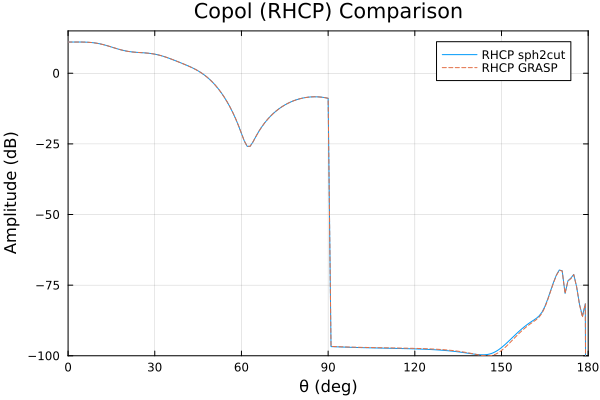
plot(xlim = (0, 180), ylim = (-100, 15), framestyle = :box,
     title = "Crosspol (LHCP) Comparison")
plot!(cut_julia, phi = 0, pol = 2, label = "LHCP sph2cut")
plot!(cut_grasp, phi = 0, pol = 2, ls = :dash, label = "LHCP GRASP")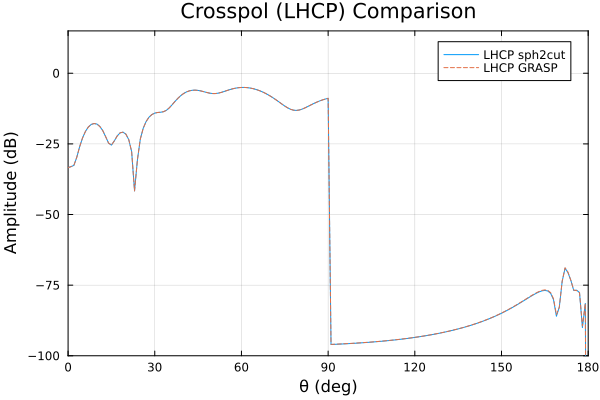
The rapid dropoff at $\phi = 90^\circ$ occurs because the original pattern data from which the spherical wave coefficients were derived was only nonzero in the forward hemisphere of the antenna. Finite amplitudes in the reconstructed patterns for $\theta > 90^\circ$ are due to the discontinuity in the fields at $\theta = 90^\circ$, which would require an infinite number of modes to reproduce exactly.
using TicraUtilitiesInteroperability with HFSS Format Files
The developers of HFSS have adopted file formats that are slight variations on Ticra-style cut files and spherical wave files. TicraUtilities provides functions, described in this section, to read and write such files, and to convert between HFSS format and Ticra format.
To assist with the following demonstrations, we define a convenience function named head which displays the first few lines of a file:
head(fname, n=6) = foreach((il) -> println(il[2]), zip(1:n, eachline(fname)))head (generic function with 2 methods)FFD Files
FFD files (which have extensions ".ffd") are used by HFSS to specify "Far Field Incident Wave" sources. The data contained in such a file is essentially the same as that in a Ticra-compatible spherical polar cut file, but stored in a different order. Another difference is that FFD files always use an $E_\theta$ and $E_\phi$ field decomposition, as opposed to the several choices for polarization basis vectors allowed for cut files.
The TicraUtilities package provides functions read_ffdfile and write_ffdfile to read and write FFD files (both "frequency-independent" and "frequency-dependent" files). Here is an example of such a file:
ffdfile = joinpath(dirname(pathof(TicraUtilities)), "..", "test", "ffd", "dipole_findep.ffd")
head(ffdfile)
0 180 91
-180 180 181
1.322357621667480e-04 6.963056517931414e-04 2.024889625826101e-03 -4.704676594853991e-04
2.028228365327812e-04 6.794623966727617e-04 2.019041156231071e-03 -4.944817800974969e-04
2.731628025149285e-04 6.617913212852125e-04 2.010732795996609e-03 -5.178934508296110e-04
3.431699616997869e-04 6.433139551138305e-04 1.999974667579878e-03 -5.406741481672893e-04As seen from the first few lines shown above, this file contains no frequency information, hence it is a "frequency-independent" FFD file. Below, we read it into Julia using read_ffdfile:
ffd = read_ffdfile(ffdfile)Ffd
frequency 0.0
theta 0.0:2.0:180.0
phi -180.0:2.0:180.0
evec 91×181 Matrix{SVector{2, ComplexF64}}
read_ffdfile returns an object of type Ffd, containing the far-field data stored in the file. Note that the frequency field of the resulting structure is set to 0, indicating that the input file was frequency-independent. Only a single Ffd object was returned because the file consisted of a single frequency-independent "partition". Here are the first few lines of a multi-frquency FFD file:
ffdsfile = joinpath(dirname(pathof(TicraUtilities)), "..", "test", "ffd", "dipole_fdep_3freqs.ffd")
head(ffdsfile)
0 180 91
-180 180 181
Frequencies 3
Frequency 1.000000000000000e+10
1.322357621667480e-04 6.963056517931414e-04 2.024889625826101e-03 -4.704676594853991e-04
2.028228365327812e-04 6.794623966727617e-04 2.019041156231071e-03 -4.944817800974969e-04Note that the third line describes the number of frequency partitions contained in the file and the fourth line (which is repeated for each partition) contains the frequency (in Hz) for this particular partition. If we read in this file we obtain a vector of Ffd objects, as shown below:
ffds = read_ffdfile(ffdsfile)3-element Vector{Ffd}:
Ffd with frequency=1.0e10, theta=0.0:2.0:180.0, phi=-180.0:2.0:180.0
Ffd with frequency=2.0e10, theta=0.0:2.0:180.0, phi=-180.0:2.0:180.0
Ffd with frequency=3.0e10, theta=0.0:2.0:180.0, phi=-180.0:2.0:180.0The values stored in the fields of a Ffd object can be retrieved using the functions get_theta, get_phi, get_evec and get_frequency.
Ffd/Cut Conversion
Ffd objects (or vectors of same) can be converted to/from Cut objects (or vectors of same) using functions ffd2cut and cut2ffd. For example:
cuts_from_ffds = ffd2cut(ffds)3-element Vector{Cut{StepRangeLen{Float64, Base.TwicePrecision{Float64}, Base.TwicePrecision{Float64}, Int64}, StepRangeLen{Float64, Base.TwicePrecision{Float64}, Base.TwicePrecision{Float64}, Int64}, 2}}:
Cut with ncomp=2, icomp=1, phi=0.0:2.0:358.0, theta=0.0:2.0:180.0
Cut with ncomp=2, icomp=1, phi=0.0:2.0:358.0, theta=0.0:2.0:180.0
Cut with ncomp=2, icomp=1, phi=0.0:2.0:358.0, theta=0.0:2.0:180.0Note that the frequency information stored in ffds will be lost when creating cuts_from_ffds, since Cut objects do not contain any frequency information. One can easily gather up a vector of the Ffd frequencies using, e.g.
ffd_freqs = get_frequency.(ffds)3-element Vector{Float64}:
1.0e10
2.0e10
3.0e10FFD File/Cut File Conversion
The functions ffd2cut and cut2ffd can also be used to directly create a file of one type from a file of the other, by specifying two (String) positional arguments. For example
ffdsfile = joinpath(dirname(pathof(TicraUtilities)), "..", "test", "ffd", "dipole_fdep_3freqs.ffd")
cutsfile = joinpath(tempdir(), "cuts_from_ffds.cut")
ffd2cut(ffdsfile, cutsfile)
head(cutsfile)
f = 1.0e10, ϕ = 0.0 cut from ffd2cut on 2026-06-08 at 13:30:56.352
0.000 2.000 91 0.000 1 1 2
-1.3223576217E-04 -6.9630565179E-04 -2.0248896258E-03 4.7046765949E-04
-3.4675364321E-03 -2.8842965902E-02 -1.9937395547E-03 5.6660614379E-04
-6.8245411493E-03 -5.6968006375E-02 -1.9558924008E-03 6.5995905818E-04
-1.0207985285E-02 -8.5081314731E-02 -1.9108930296E-03 7.4968053746E-04Similarly, one can create a new FFD file from the recently created cut file:
new_ffds_file = joinpath(tempdir(), "new_ffds.ffd")
cut2ffd(cutsfile, new_ffds_file, frequency=ffd_freqs)
head(new_ffds_file)
0.0 180.0 91
0.0 358.0 180
Frequencies 3
Frequency 1.0e10
-1.322357621700000e-04 -6.963056517900000e-04 -2.024889625800000e-03 4.704676594900000e-04
-2.028228365300000e-04 -6.794623966700000e-04 -2.019041156200000e-03 4.944817801000000e-04The frequency keyword argument is required above in this multi-frequency case, as discussed in the documentation of cut2ffd.
FFd/SPHQPartition Conversion
The functions ffd2sph and sph2ffd can be used to convert between sampled far-field data in a Ffd object (or vector of such objects) to Q-type spherical wave coefficients in a SPHQPartition object (or vector of such objects). For example:
ffdFfd
frequency 0.0
theta 0.0:2.0:180.0
phi -180.0:2.0:180.0
evec 91×181 Matrix{SVector{2, ComplexF64}}
sph_from_ffd = ffd2sph(ffd)SPHQPartition
prgtag cut2sph 2026-06-08 13:30:58.411
idstrg Spherical Wave Q-Coefficients
nthe 180
nphi 180
nmax 6
mmax 4
qsmns OffsetArray{ComplexF64}(1:2,-4:4,1:6)
powerms OffsetArray{Float64}(0:4)
Note that even though ffd contains fields sampled every 2° in both θ and ϕ, the maximum spherical mode indices in sph_from_ffd are nmax = 6 and mmax = 4. This is because ffd2sph includes spherical modes only until the excluded modes' power is less than pwrtol times the total modal power, and the default value of pwrtol is 1e-6.
We can reconstruct an Ffd object using sph2ffd:
ffd2 = sph2ffd(sph_from_ffd)Ffd
frequency 0.0
theta 0.0:2.0:180.0
phi 0.0:2.0:358.0
evec 91×180 Matrix{SVector{2, ComplexF64}}
Note that the range of ϕ for ffd2 begins at 0, not at -180, as in ffd. This rearrangement is the default behavior because Ticra-compatible cut files should generally begin at ϕ = 0. For comparison purposes, we can force the ϕ values to be the same as in ffd by using the phi keyword argumment of sph2ffd:
ffd3 = sph2ffd(sph_from_ffd, phi = get_phi(ffd))Ffd
frequency 0.0
theta 0.0:2.0:180.0
phi -180.0:2.0:180.0
evec 91×181 Matrix{SVector{2, ComplexF64}}
Now we can examine the maximum difference in the electric field vectors between original and reconstructed Ffd objects:
using LinearAlgebra: norm
maximum(norm, get_evec(ffd3) - get_evec(ffd))0.0004230967397751991This relatively large value is due to the default modal truncation in ffd2sph with pwrtol = 1e-6. If we had specified pwrtol = 0.0, then many more spherical modes would be included (determined by the field sampling density in the Ffd object), so that the maximum norm above would have been on the order of 1e-15, limited only by Float64 precision.
SWEF File/SPH File Conversion
HFSS has introduced a slightly modified version of Ticra's spherical mode (Q) file format. HFSS-compatible files include frequency information within each partition in an extra 9th line, and use the ".swef" file extension, in contrast to Ticra's choice of ".sph" extension. TicraUtilities functions read_sphfile and write_sphfile can read and write both Ticra and HFSS format spherical wave files. Here is an example of an HFSS-format spherical wave file:
swef_file = joinpath(dirname(pathof(TicraUtilities)), "..", "test", "ffd", "center_element_rhcp_excited_q.swef")
head(swef_file, 12)
2024/06/13 at 08:14:07, Source: test01_asymmetric_tabulated_pattern, Freq [GHz]: 1.000000000
SWE
360 72 180 35
Rotation angles (Theta, Phi, Chi)=(0.00000, 0.00000, 0.00000)
0.0000 180.00 0.0000 359.99 0.00000
0.0000 180.00 0.0000 359.99 0.00000
SWEP_DUMMY_FILE_NAME
SWEP_DUMMY_FILE_NAME
Frequency 1000000000
0 1.5705928803347543E-03
-2.5694136205429985E-04 3.7890679477123237E-04 3.2625988289593788E-02 -6.3616427818742024E-03
-4.1993140277499577E-04 -3.2077593843978652E-04 1.1580213913699200E-02 3.4643097175139671E-02Note the frequency information in line 9 above. We now read in this file:
swef = read_sphfile(swef_file)SPHQPartition
frequency 1.0e9
prgtag 2024/06/13 at 08:14:07, Source: test01_asymmetric_tabulated_pattern, Freq [GHz]: 1.000000000
idstrg SWE
nthe 360
nphi 72
nmax 180
mmax 35
qsmns OffsetArray{ComplexF64}(1:2,-35:35,1:180)
powerms OffsetArray{Float64}(0:35)
The frequency is displayed on the first line of the above printout. The type of the object returned by the above call is SPHQPartition, just as for reading in a Ticra-format spherical wave file. The difference is that the object's frequency field is set to a nonzero value in the case of an HFSS-format file, but is zero In the case of a Ticra-format file.
It is easy to create a Ticra-format (.sph) spherical wave file from an HFSS-format (.swef) file. Simply use style = :ticra in the call to write_sphfile:
sph_file = joinpath(tempdir(), "temp.sph")
write_sphfile(sph_file, swef, style = :ticra)
head(sphfile, 12)
2024/06/13 at 08:14:07, Source: test01_asymmetric_tabulated_pattern, Freq [GHz]: 1.000000000
SWE
360 72 180 35
Rotation angles (Theta, Phi, Chi)=(0.00000, 0.00000, 0.00000)
0.0000 180.00 0.0000 359.99 0.00000
0.0000 180.00 0.0000 359.99 0.00000
SWEP_DUMMY_FILE_NAME
SWEP_DUMMY_FILE_NAME
0 1.5705928803347543E-03
-2.5694136205429985E-04 3.7890679477123237E-04 3.2625988289593788E-02 -6.3616427818742024E-03
-4.1993140277499577E-04 -3.2077593843978652E-04 1.1580213913699200E-02 3.4643097175139671E-02
-4.1472657605764844E-05 -3.5462126789663831E-05 -1.4973513125029720E-02 1.2455486971700990E-02As seen above, the newly created sph_file lacks the extra 9th line containing frequency information.
To create an HFSS-format (.swef) spherical wave file from a Ticra-format (.sph) file, one must specify both style = :hfss and assign a value for the frequency argument:
sph = read_sphfile(sph_file)
new_swef_file = joinpath(tempdir(), "temp.swef")
write_sphfile(new_swef_file, sph, style = :hfss, frequency = 1e9)
head(new_swef_file, 12)
2024/06/13 at 08:14:07, Source: test01_asymmetric_tabulated_pattern, Freq [GHz]: 1.000000000
SWE
360 72 180 35
Rotation angles (Theta, Phi, Chi)=(0.00000, 0.00000, 0.00000)
0.0000 180.00 0.0000 359.99 0.00000
0.0000 180.00 0.0000 359.99 0.00000
SWEP_DUMMY_FILE_NAME
SWEP_DUMMY_FILE_NAME
Frequency 1.0e9
0 0.0015705928803347543
-2.5694136205429979E-04 3.7890679477123231E-04 3.2625988289593788E-02 -6.3616427818742024E-03
-4.1993140277499577E-04 -3.2077593843978652E-04 1.1580213913699199E-02 3.4643097175139671E-02FFD/SWEF File Conversion
The functions ffd2sph and sph2ffd can also be used to directly convert between FFD and SWEF files. For example:
ffds_file = joinpath(dirname(pathof(TicraUtilities)), "..", "test", "ffd", "dipole_fdep_3freqs.ffd")
swef_file = joinpath(tempdir(), "temp_file.swef")
ffd2sph(ffds_file, swef_file, style = :hfss)
3-element Vector{SPHQPartition}:
SPHQPartition with nmax = 6, mmax = 4
SPHQPartition with nmax = 6, mmax = 4
SPHQPartition with nmax = 6, mmax = 4head(swef_file, 12)cut2sph 2026-06-08 13:30:59.267
Spherical Wave Q-Coefficients
180 180 6 4
dummy t4
1.0 2.0 3.0 4.0 5.0
1.0 2.0 3.0 4.0 5.0
dummy t7
dummy t8
Frequency 1.0e10
0 0.31333596072981962
5.4828083812176686E-05 -7.2935632695934611E-04 7.8476419733153491E-01 9.7090203980805284E-02
-7.0634409666076742E-04 -1.5647684091538343E-04 7.7512373461301415E-04 6.1814531268193954E-04Creating an FFD file from a SWEF file is equally simple:
new_ffds_file = joinpath(tempdir(), "temp.ffd")
sph2ffd(swef_file, new_ffds_file)
3-element Vector{Ffd{StepRangeLen{Float64, Base.TwicePrecision{Float64}, Base.TwicePrecision{Float64}, Int64}, StepRangeLen{Float64, Base.TwicePrecision{Float64}, Base.TwicePrecision{Float64}, Int64}}}:
Ffd with frequency=1.0e10, theta=0.0:2.0:180.0, phi=0.0:2.0:358.0
Ffd with frequency=2.0e10, theta=0.0:2.0:180.0, phi=0.0:2.0:358.0
Ffd with frequency=3.0e10, theta=0.0:2.0:180.0, phi=0.0:2.0:358.0head(new_ffds_file)0.0 180.0 91
0.0 358.0 180
Frequencies 3
Frequency 1.0e10
-1.060742081526285e-04 -6.399447013839306e-04 -2.003287882096811e-03 4.232410763996113e-04
-1.759233294464490e-04 -6.247839638124030e-04 -1.998365596768422e-03 4.453169973671915e-04Tabulated Electrical Properties (TEP) Files
There are two styles of TEP files:
- The original TEP file introduced by GRASP8, referred to as a "scattering surface TEP file."
- The new format introduced by the QUPES program, referrred to as a "periodic unit cell TEP file."
TicraUtilities provides functions to read and write either style of TEP file, and to convert between the two.
TEP files can be read using the read_tepfile function, and written to disk using the write_tepfile function.
Scattering Surface TEP Files
Here is an example of reading a scattering surface TEP file:
using TicraUtilities
tepfile = joinpath(dirname(pathof(TicraUtilities)), "..", "test", "tepscatter1freq.tep")
tep_s1 = read_tepfile(tepfile)
TEPscatter
title el_prop values for object gridded_to_tabulated
theta 0.0:5.0:70.0
phi 0.0:15.0:345.0
sff 2×2×15×24 Array{ComplexF64, 4}
sfr 2×2×15×24 Array{ComplexF64, 4}
srf 2×2×15×24 Array{ComplexF64, 4}
srr 2×2×15×24 Array{ComplexF64, 4}
For this TEP file that contains data for a single frequency, a single object of type TEPscatter is returned. For a multi-frequency TEP file, a vector of TEPscatter objects would have been returned. As the REPL printout shows, the object contains fields title, theta, phi, sff, sfr, srf, and srr. They can be accessed via the functions get_title, get_theta, get_phi, get_sff, get_sfr, get_srf, and get_srr, respectively. The last four fields are multidimensional arrays containing complex scattering coefficients, sampled on a regular grid in the $\theta$-$\phi$ plane. The arrays all have dimensions 2×2×nt×np, where nt = length(get_theta(tep_s1)) is the number of θ values and np = length(get_phi(tep_s1)) is the number of ϕ values. sff and srr are reflection coefficients for front and rear surface incidence, respectively. srf and sfr are transmission coefficients for front and rear surface incidence, respectively. For any of these, fixing the last two indices (i.e., choosing particular values of θ and ϕ) while allowing the first two indices to vary results in a 2×2 matrix. For the reflection coefficient arrays the 2×2 matrices contain $\begin{bmatrix} R_{\theta, \theta} & R_{\theta, \phi} \\ R_{\phi, \theta} & R_{\phi, \phi} \end{bmatrix}$, while for the two transmission coefficient arrays, they contain $\begin{bmatrix} T_{\theta, \theta} & T_{\theta, \phi} \\ T_{\phi, \theta} & T_{\phi, \phi} \end{bmatrix}$.
Periodic Unit Cell TEP Files
TicraUtilities currently cannot accommodate TEP files that contain sweeps of geometrical parameters. I.e., the file may sweep only incidence angles and frequencies. Here is an example of reading a periodic unit cell TEP file:
using TicraUtilities
tepfile = joinpath(dirname(pathof(TicraUtilities)), "..", "test", "ticra_tools_twister.tep")
tep_p1 = read_tepfile(tepfile)
TEPperiodic
name strip_01
class periodic_unit_cell_rectangular_patch
theta 0.0:20.0:40.0
phi 0.0:20.0:340.0
freqs [29.0 GHz, 30.0 GHz]
sff 2×2×3×18×2 Array{ComplexF64, 5}
sfr 2×2×3×18×2 Array{ComplexF64, 5}
srf 2×2×3×18×2 Array{ComplexF64, 5}
srr 2×2×3×18×2 Array{ComplexF64, 5}
This call returns a single, multifrequency TEPperiodic object. As the REPL printout shows, the object contains fields name, class, theta, phi, freqs, sff, sfr, srf, and srr. The values stored in these fields may be accessed using the functions get_name, get_class, get_theta, get_phi, get_freqs, get_sff, get_sfr, get_srf, and get_srr, respectively. The last four fields are multidimensional arrays containing complex scattering coefficients, sampled on a regular grid in the $\theta$-$\phi$-frequency space. The arrays all have dimensions 2×2×nt×np×nf, where nt = length(get_theta(tep_p1)) is the number of θ values, np = length(get_phi(tep_p1)) is the number of ϕ values, and nf = length(get_freqs(tep_p1)) is the number of frequencies. sff and srr are reflection coefficients for front and rear surface incidence, respectively. srf and sfr are transmission coefficients for front and rear surface incidence, respectively. For any of these, fixing the last three indices (i.e., choosing particular values of θ, ϕ, and frequency) while allowing the first two indices to vary results in a 2×2 matrix. For the reflection coefficient arrays the 2×2 matrices contain $\begin{bmatrix} R_{\text{TE}, \text{TE}} & R_{\text{TE}, \text{TM}} \\ R_{\text{TM}, \text{TE}} & R_{\text{TM}, \text{TM}} \end{bmatrix}$, while for the two transmission coefficient arrays, they contain $\begin{bmatrix} T_{\text{TE}, \text{TE}} & T_{\text{TE}, \text{TM}} \\ T_{\text{TM}, \text{TE}} & T_{\text{TM}, \text{TM}} \end{bmatrix}$.
TEPperiodic $\leftrightarrow$ TEPscatter Conversion
The function tepp2s will convert an object of type TEPperiodic to an object (or vector of objects in the case of multiple frequencies) of type TEPscatter. The function teps2p provides conversion in the opposite direction. As an example, we convert tep_p1 from the previous example to TEPscatter format:
using Unitful: @u_str
d = 15u"mm" # Distance separating unit cell front and rear surfaces
tep_s2 = tepp2s(tep_p1, d)
2-element Vector{TEPscatter{StepRangeLen{Float64, Base.TwicePrecision{Float64}, Base.TwicePrecision{Float64}, Int64}}}:
TEPscatter with theta=0.0:20.0:40.0, phi=0.0:20.0:340.0
TEPscatter with theta=0.0:20.0:40.0, phi=0.0:20.0:340.0Since tep_p1 contained two frequencies, tep_s2 is a vector of two TEPscatter objects. It was necessary to supply the distance d as an argument to tepp2s because it is needed to compute the phase correction involved in the conversion. Similarly, when converting in the other direction, both the distance and frequency (or frequencies) must be provided, because both are needed to compute the phase correction but neither is included in a scattering surface-type TEP file/object. These can be obtained from tep_p1 for this example:
freqs = get_freqs(tep_p1)2-element Vector{Unitful.Quantity{Float64, 𝐓^-1}}:
29.0 GHz
30.0 GHzNow we have the necessary inputs to convert tep_s2 back to TEPperiodic format:
tep_p3 = teps2p(tep_s2, d, freqs)TEPperiodic
name tep_periodic
class created_by_teps2p
theta 0.0:20.0:40.0
phi 0.0:20.0:340.0
freqs [29.0 GHz, 30.0 GHz]
sff 2×2×3×18×2 Array{ComplexF64, 5}
sfr 2×2×3×18×2 Array{ComplexF64, 5}
srf 2×2×3×18×2 Array{ComplexF64, 5}
srr 2×2×3×18×2 Array{ComplexF64, 5}
We can check whether the scattering coefficients in tep_p3 that resulted from round-trip conversion are exactly equal to those of the original tep_p1:
(get_sff(tep_p3) == get_sff(tep_p1), get_sfr(tep_p3) == get_sfr(tep_p1),
 get_srf(tep_p3) == get_srf(tep_p1), get_srr(tep_p3) == get_srr(tep_p1))
(true, false, false, false)Only the sff (front surface reflection coefficients) entries are exactly equal. This is because only front surface reflection coefficients do not require phase corrections during the conversions. There is a slight floating point error incurred when computing the phase corrections, as shown below:
maximum(abs, get_sfr(tep_p1) - get_sfr(tep_p3))2.482534153247273e-16Instead of testing for exact equality, we can check for approximate equality:
(get_sff(tep_p3) ≈ get_sff(tep_p1), get_sfr(tep_p3) ≈ get_sfr(tep_p1),
 get_srf(tep_p3) ≈ get_srf(tep_p1), get_srr(tep_p3) ≈ get_srr(tep_p1))
(true, true, true, true)Surface Files
TICRA-compatible surface (.sfc) files can be read using the read_surface function, and written to disk using the write_surface function. The results of reading a surface file are stored in an object of type TicraUtilities.Surface as in the following example:
sfcfile = joinpath(joinpath(dirname(pathof(TicraUtilities)), "..", "test", "parent_parabola.sfc"))
sfc = read_surface(sfcfile)
Surface
text: Surface z-values for reflector: main_reflector, with unit: in.
x: 19.8176:0.3446666666666667:123.2176
y: -51.7:0.3446666666666667:51.7
z: 301×301 Matrix{Float64}
Values within the Surface object can be accessed via the functions get_x, get_y, get_z, and get_text.
The + and - operators have been overloaded to work on surfaces, resulting in new surfaces whose $z$ values are the sum or difference of those of the operand surfaces:
sfc2 = sfc + sfc
get_z(sfc2) ≈ 2 * get_z(sfc)truesfc3 = sfc - sfc
maximum(abs, get_z(sfc3))0.0Array Excitation Files
TICRA-compatible array excitation (.exi) files can be read using the `read_exifile function, and written to disk using the write_exifile function. The results of reading an array excitation file are stored in an object of type Exi as in the following example:
exifile = joinpath(joinpath(dirname(pathof(TicraUtilities)), "..", "test", "beam_A14R.exi"))
exi = read_exifile(exifile)
Exi
header: ["Beam A14R"]
ampdb: 16-element Vector{Float64}
phsdeg: 16-element Vector{Float64}
id: 16-element Vector{String}
Values within the Exi object can be accessed via the functions get_header, get_ampdb (or amplitude_db), get_phsdeg (or phase_deg), and get_ids. For example:
get_ampdb(exi)16-element Vector{Float64}:
-22.079632
-18.455905
-13.189809
-12.546182
-20.599867
-13.271168
-8.728724
-7.783794
-11.498586
-10.453275
-8.245438
-9.028067
-17.107155
-22.580741
-17.524788
-13.861297get_phsdeg(exi)16-element Vector{Float64}:
-21.860822
17.101443
-4.950916
-18.354877
-17.122747
17.979759
9.269317
-6.876699
-13.262062
17.23366
2.516957
-7.826971
0.33419
25.276105
10.616932
-7.269771Optimization Station Files
TICRA-compatible optimization station (.sta) files, also known as "Field Directions" file, can be read using the `read_stationfile function, and written to disk using the write_stationfile function. The results of reading a station file are stored in a vector of objects of type Station as in the following example:
stationfile = joinpath(joinpath(dirname(pathof(TicraUtilities)), "..", "test", "scenario2_coverage.sta"))
stations = read_stationfile(stationfile)
1-element Vector{Station}:
Station partition with 397 stationsValues within a Station object can be accessed via the functions get_npoint, get_u, get_v, get_goal, get_weight, get_ipol, get_rot, get_att, and get_id.
TICRA Object Repository (TOR) Files
TOR files can be read and written using the functions read_torfile and write_torfile, respectively. Here is an example of reading a TOR file:
torfile = joinpath(dirname(pathof(TicraUtilities)), "..", "test", "tabulated_rim_tor_file.tor")
torobjs = read_torfile(torfile)
2-element Vector{TorObj}:
east_9m_rim::tabulated_rim_xy
extsub_sw.rim::tabulated_rim_xyread_torfile returns a vector of TorObj objects. Here is the first element of this vector:
torobj = torobjs[1]east_9m_rim tabulated_rim_xy (
file_name : h_9m_scalloped_rim.xyz,
unit : in,
number_of_points : 112,
translation : struct(x: 0.0 in, y: 0.0 in),
polar_origin : struct(status: automatic, x: 0.0 in, y: 0.0 in))
The name and TICRA type of the object are shown, followed by propertynames and their corresponding values. These can be extracted from the TorObj object using functions get_name, get_objtype, get_propname, and get_propval. For example:
get_name(torobj)"east_9m_rim"get_objtype(torobj)"tabulated_rim_xy"get_propname(torobj)5-element Vector{String}:
"file_name"
"unit"
"number_of_points"
"translation"
"polar_origin"get_propval(torobj)5-element Vector{String}:
"h_9m_scalloped_rim.xyz"
"in"
"112"
"struct(x: 0.0 in, y: 0.0 in)"
"struct(status: automatic, x: 0.0 in, y: 0.0 in)"The parse_tor_struct function can be used to parse the TICRA struct objects listed in the final two elements of get_propval(torobj):
struct1 = parse_tor_struct(get_propval(torobj)[end-1])(x = 0.0 inch, y = 0.0 inch)struct2 = parse_tor_struct(get_propval(torobj)[end])(status = "automatic", x = 0.0 inch, y = 0.0 inch)struct1 and struct2 are NamedTuples. Their field names and values can be obtained using Julia's keys and values functions:
keys(struct2)(:status, :x, :y)values(struct2)("automatic", 0.0 inch, 0.0 inch)Note that the parsed values of numeric quantities with associated units (such as "x" and "y" in the above example) are converted to Unitful quantities. For example:
struct2.x0.0 inchThe purely numeric portion and the units can be extracted using functions supplied by Unitful:
using Unitful: unit, ustrip
unit(struct2.x)inchustrip(struct2.x)0.0Alternatively, both can be converted to strings, if desired:
string(struct2.x)"0.0 inch"Of the units that can occur in a TOR file, "in" is the only one which is modified when translated to Julia. In the Julia representation, "inch" is used instead of "in" to avoid confusion with the built-in Julia function in.
This page was generated using Literate.jl.